


The WhatsApp messaging app has an active user base of over 500 million in India and a little over 2 billion globally. Everyone in India uses WhatsApp to communicate with friends, families and coworkers. It’s time for you to start using another important feature of WhatsApp: WhatsApp Ads.
As a new business owner, targeting your audience with click-to-WhatsApp ads can help your business stand out and raise awareness about your products and services.
In case you own or work for a business that already has a well-oiled marketing engine, you can still leverage click-to-WhatsApp ads to boost engagement with your leads.
Not only that, but with click-to-WhatsApp ads, your leads or customers are instantly redirected to your WhatsApp chat. This allows you to address any issues or concerns they might have about pricing, use cases or whether the service or product you are selling is suitable for them.
If you are wondering what click-to-WhatsApp ads are and how you deploy them on Facebook and Instagram, just KEEP READING!
Click-to-WhatsApp ads allow audiences to get in touch with a business on WhatsApp directly from its Facebook or Instagram ad. This means you can interact with potential customers (leads) instantly, in turn, saving them the hassle of filling out a form on your website.
As a business owner or marketer, you may be running Facebook and Instagram ads promoting your brand and its offerings. As you know, you can add a CTA (call-to-action) button to these ads. This button helps your leads take the next step, like visiting your business website or booking a demo. In the case of click-to-WhatsApp ads, you can redirect them directly to your WhatsApp chat.
Click-to-WhatsApp ads are a straightforward way for you to connect directly with potential customers. With a prominent ‘Send Message on WhatsApp’ CTA button, these ads allow consumers to easily chat with your agents on WhatsApp.
Apart from streamlining brand-consumer communication, they also increase conversion rates. How? When a lead can communicate with your business without much difficulty, you have a better chance of addressing their concerns, thereby turning them into paying customers faster.
Say you own a software business and most of your leads do not have much clarity on how your product can solve their pain points. When you connect with them via WhatsApp, you can answer all of their queries satisfactorily through one-on-one messaging and help them better understand your products or services.
Pro Tip: Check out how WhatsApp CRM can help you with not just ads but so much more like bulk messaging, scheduling messages and running chatbots.
Before we walk you through the steps involved in creating a click-to-WhatsApp ad, let’s see how they can benefit your business.

WhatsApp allows you to send personalised messages, addressing individuals by name and tailoring content based on their preferences.
As far as users are concerned, they can respond directly to WhatsApp ads by simply clicking on the Send WhatsApp message button, encouraging a two-way conversation that builds a stronger connection between you and your audience.
The best part: you can segment your audience on WhatsApp with the help of labels, sending targeted messages to different customer groups based on their interests or buying behaviour.
WhatsApp notifications are prominently displayed on users’ devices, ensuring that your ads are seen promptly, leading to higher engagement rates.
Users can interact with multimedia content such as videos or images, enhancing the overall engagement experience. Incorporating interactive features like polls or surveys within WhatsApp ads can further boost engagement.

You can tailor your messages to align with specific cultural nuances, ensuring that you connect with and cater to audiences no matter what part of the world they are from.
What’s more, WhatsApp supports multiple languages, allowing you to communicate with diverse audiences. With region-specific promotions or offers, you can enhance the appeal of your click-to-WhatsApp ads among WhatsApp users, which helps them resonate better with your target audiences regardless of their location.
Unlike traditional print media, WhatsApp ads eliminate the need for printing and distribution, significantly reducing overall advertising costs.
Both WhatsApp and WhatsApp Business are free, allowing your marketing messages to reach a large audience without incurring additional expenses for message delivery. Thus, you can allocate your budget more efficiently by targeting specific demographics or customer segments, maximising the impact of your advertising expenses.
Incorporating images and videos allows you to tell a compelling story, capturing the audience’s attention and conveying your brand personality effectively.
Thus, multimedia elements allow you to showcase your products or services in detail, helping users make an informed decision. Plus, you have the flexibility to express your brand creatively through multimedia, fostering a memorable and positive impression among users.

With WhatsApp ads, you bring leads directly into your WhatsApp chat, facilitating faster query resolution. What this does is it helps nurture leads into becoming customers faster.
Not only that, but once the leads are in your WhatsApp chat, you can engage with them to share real-time updates on their order status, shipping information and delivery time any time you like.
You can configure WhatsApp ads to reach only a select group of your target audience, based on their age group, location, etc. This means you can target the right people with your ads so your efforts and resources are well-spent.
With Ads Manager, you can decide who you want to target with a particular ad. It could be anyone, for example:
Someone who has had a conversation with your business in the past but didn’t end up making a purchase
Through Facebook Pixel: it is a code from Facebook that you put in your website that helps with tracking the movement of the person visiting your website and storing their details so you can run a targeted ad later
Lastly, people who have already interacted with your (Facebook, Instagram or WhatsApp ads) ads in the recent past
Also Read: WhatsApp Automation
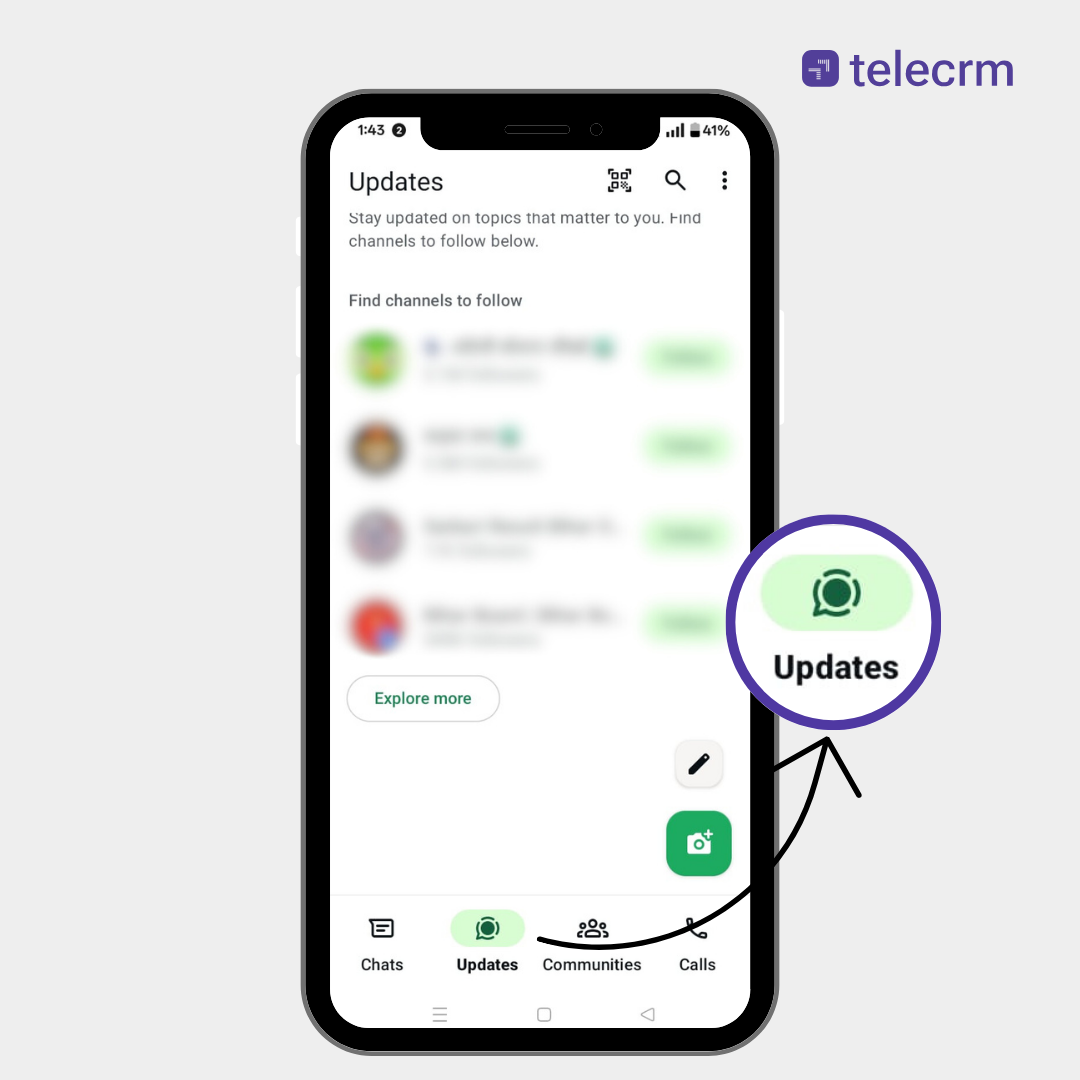
In June 2025, they rolled out new updates that brought ads inside the app itself.
Here’s what’s new and why it matters for your business:
Since June 16, 2025, businesses can place ads within the Updates tab, which houses both Status and Channels.
Ads are tailored using lightweight signals such as:
If a user has linked their WhatsApp account with Facebook or Instagram via the Meta Account Center, advertisers can optionally leverage ad preferences and demographic data across Meta platforms to refine targeting.
WhatsApp now allows creators and businesses to leverage mobile app monetisation through Channels and API integration:

You need to have a WhatsApp Business account before you can deploy your first click-to-WhatsApp ad. Set up an account on the WhatsApp Business app or get the WhatsApp Business API for your business.
As a business owner, you might already be using WhatsApp for your business. If you are using the standard version, read How to Change WhatsApp to a Business Account to learn how to switch to the business version without losing data.
On the other hand, if you already have the WhatsApp Business app installed, follow the steps below to create your first WhatsApp ad.
Open the WhatsApp business app, click the three dots in the top right corner and tap on Business Tools.

In the ‘Business tools’ settings, tap on Advertise.

Now you are in Step 1 of ad creation, add an ad description for a Facebook ad, upload the desired ad creative and click next.

You can follow the same steps for your Instagram ad as well.

Step 2: In this step, you set the budget and duration of your ad and specify the demographics of the audience you want to target.

You can change the budget and duration of your ad as per your needs.

And set the demographics of the audience you want to target, such as their region, age and gender.

Step 3: The final step is to preview your ad and its settings one last time.

Then click next to add the payment method, make the payment and publish your ad.

Once you have made the payment and clicked on ‘Create Ad’, your ad will be sent for approval by WhatsApp. Once approved, which usually takes about 4-5 hours, it shows up under the ‘Manage’ section.
You now have your click-to-WhatsApp ad up and running on the platform of your choice: Facebook or Instagram.
But this is not the only way to create and run click-to-WhatsApp ads. The other method involves using the Ads Manager.
If you already know how to create ads or run ads on Ads Manager? Let’s skip the basics. Here’s how you can pick the WhatsApp message CTA directly: First, set up your Facebook business Page.
Head over to Ads Manager, create a new campaign and select ‘engagement’ from the list of campaign objectives.

After hitting ‘continue’, select the ‘manual engagement campaign’ setting. Hit ‘continue’ to move to the next step.

In this tab, you set the ‘campaign name’, specify the desired ‘special ad category’ and select the ‘country’ you want to run the ad in. You have to set the ‘campaign details’ here as well, namely buying type, campaign spending limit, etc.
Once done, press next.

In this tab, you specify the “ad set name” and choose the desired “conversion location” – here you have to select “messaging apps”. In the “ad type” drop-down menu, select “click to message” and hit next.

Finally, you will reach a page where you can select the destination for the messages you receive. Insert a tick in the box next to ‘WhatsApp’ and select the WhatsApp number below where you would like to receive these messages.

So, that’s how you create a click-to-WhatsApp ad with Facebook Ads Manager. Read Facebook’s Guide to Creating a WhatsApp Ad with Ads Manager to learn more.
Recommended read: Learn How to add a WhatsApp button on your Facebook page to directly bring leads to your WhatsApp rather than engaging with them in FB messenger.
Type | Where it runs | Purpose | How it works |
Click-to-WhatsApp Ads (CTWA) | Instagram, Facebook, Messenger (via Meta Ads Manager) | Lead generation, support, direct sales chat | User clicks ad → lands in WhatsApp chat window with your business |
WhatsApp Status Ads | WhatsApp Updates tab (between statuses) | Brand visibility, click-through to chat | Shown to users based on location, channels followed and Meta ad preferences |
Promoted Channels | WhatsApp Channel directory | Grow your WhatsApp Channel followers | Boost your Channel’s visibility so more users can discover and follow you |
WhatsApp Channel Subscriptions | Inside Channels | Monetise premium content | Offer exclusive paid updates for subscribers (e.g., tips, offers, VIP access) |
Here are some proven practices to get the most out of every WhatsApp ad you run:
Don’t just run generic ads. Make sure your ad headline, visual and CTA are directly aligned with what you’ll say in the first WhatsApp message.
Example: If your ad says “Get expert help to pick the right course,” your first message should immediately offer that help, not a boring “Hi, how can I help you?”
The faster you reply, the more likely the lead stays warm. Set up chatbots or assign team reps to instantly reply during business hours.
Why it works: According to Meta, messaging ads that lead to fast replies see up to 3x better conversion rates.
After the initial conversation, don’t let the lead go cold.
Pro Tip: Leads who don’t respond right away can still convert if followed up properly.
One ad won’t work for everyone.
Why it matters: Even small tweaks can reduce your cost per lead dramatically.
Integrate WhatsApp with your CRM (like Telecrm) to:
Bottom line: Without CRM integration, your leads fall into a black hole. With it, you get visibility and control.
In this section, we’ll be discussing the click-to-WhatsApp ads run by popular Indian brands to improve engagement with their leads and customers.

JioMart regularly runs ads with a prominent ‘Send a WhatsApp Message’ button on their Facebook page. The retailer informs shoppers about its lucrative offers, enticing them to connect with it directly on WhatsApp and place their orders. Therefore, consumers don’t have to wait in endless queues to get groceries anymore.
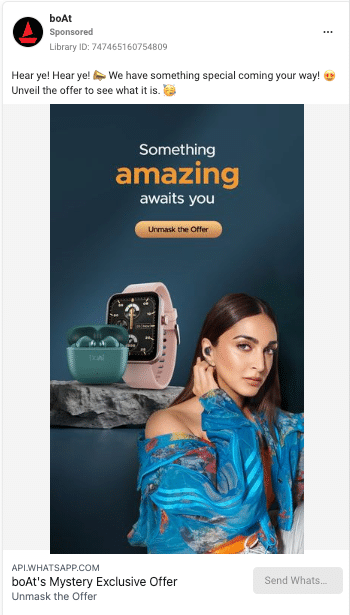
boAt sells consumer electronic products like smartwatches, headphones, speakers and more. Its ad placements are excellent considering it runs Facebook ads and brings leads from that platform directly into WhatsApp.
And because it offers prospects additional information as soon as they reach out to the company on WhatsApp, their conversion rates are quite high.

IDP Education, one of the leading study abroad consultancy firms in India, recently deployed a click-to-WhatsApp ad on Facebook to highlight the fact that its clients who apply to colleges or universities abroad are not only securing admission but also getting good scholarships.
With this click-to-WhatsApp ad, whoever is interested in studying abroad can directly connect with the company by just tapping the ‘Send WhatsApp message’ button, which gets their application process started right away.
Also read: Learn in-depth about WhatsApp marketing and how you can use the platform for lead generation and nurturing.

In conclusion, using WhatsApp ads, especially click-to-WhatsApp ads, can be a game-changer for your business. Whether you’re a new or small business seeking to promote your brand or an established one aiming to enhance engagement with your leads, these ads offer a personalised and friendly touch.
The simplicity of a WhatsApp ad campaign allows you to bring leads directly into a chat, making the process smoother. This boosts engagement and increases the likelihood of turning leads into customers.
Also, the real-time interaction feature lets you address their concerns or hesitations, helping potential customers make informed decisions.
So, if you’re ready to enhance your WhatsApp marketing campaigns or overall marketing strategy, consider incorporating click-to-WhatsApp ads into your plan for a direct and impactful connection with your customers.
No, WhatsApp doesn’t display ads in the traditional sense. Unlike other messaging apps, it’s designed to be ad-free, keeping your messaging experience clean and focused on communication with friends, family and businesses.
1. Open WhatsApp Business: Launch the WhatsApp Business app on your device.
2. Access Business Tools: Click the three dots in the top right corner and tap on “Business Tools.”
3. Navigate to Advertise: In the ‘Business Tools’ settings, tap on “Advertise.”
4. Ad Description and Creative: Add a description, upload your ad creative for Facebook and click “Next.”
5. Set Budget and Duration: Set your budget, duration and target audience demographics (region, age, gender).
6. Preview and Confirm: Review your ad settings, then click “Next.”
7. Add Payment Method: Follow the prompts to add a payment method, make the payment and click “Create Ad.”
8. Approval and Publishing: Your ad will be sent for approval by WhatsApp, usually taking 4-5 hours. Once approved, find your ad under the ‘Manage’ section. That’s it! Your WhatsApp ad is created and ready to go live.
Since WhatsApp doesn’t display traditional ads, there’s nothing to stop. If you’re seeing unwanted messages, you can manage WhatsApp notifications in Settings. Additionally, you can block or report business messages if they’re bothering you.
“Click to WhatsApp Ads” are ads on Facebook and Instagram platforms that give a CTA ‘Send WhatsApp Message’. These CTAs, when clicked upon, take the user directly to a WhatsApp chat with the business. It’s a way for businesses to engage with leads instantly and is becoming a popular method of lead generation.



© Copyright 2025 Telecrm.in - All Rights Reserved • Privacy Policy • T&C



© Copyright 2025 Telecrm.in - All Rights Reserved • Privacy Policy • T&C