

Are you losing customers because you are unable to solve their queries and inquiries quickly? Or your WhatsApp number is constantly getting blocked because of sending bulk messages? Or your customer support team is constantly wasting time doing repetitive work that could be automated.
Well if you are here that means you are facing one of these problems. This article will provide you with information that is completely going to change the way you have been using WhatsApp for your business.

WhatsApp Automation will help you run your business smoother by reducing manual work, keeping your customers happy by providing instant solutions to their problems and saving you precious time and money.
In this blog, we’ll explore what WhatsApp Automation is, why it’s important and how it can boost your business.
WhatsApp Automation is the use of automated tools, software or chatbots to manage and streamline various aspects of communication and interaction on the WhatsApp messaging platform. This technology helps businesses to send messages, respond to inquiries and execute marketing campaigns (sending promotion messages to multiple users without manual intervention).
WhatsApp Automation not only improves the efficiency of sending messages to your prospects but also boosts customer engagement.
Most businesses today face the same problem: too many messages, not enough time. Whether it’s responding to leads, reminding someone about a demo or sending updates after a purchase, doing it all manually can slow you down and frustrate your team.
That’s where WhatsApp automation helps. It takes over repetitive tasks, improves response time and allows your business to scale without increasing workload.
Here are the key benefits:
Instead of replying to every message or sending the same updates again and again, automation lets you set it up once and forget it. You can schedule reminders, trigger welcome messages and send follow-ups without lifting a finger.
When someone messages your business, they expect a quick reply. With automation, you can instantly acknowledge new leads, answer FAQs or guide them with helpful buttons. This improves their experience and builds trust right from the first message.
Let the system handle repetitive chats while your sales or support team focuses on conversations that actually need a human touch. This makes your team more efficient and less stressed.
If you’re depending on manual follow-ups, you’re going to miss some. With automation, every new inquiry gets a timely message. Every demo gets a reminder. Every follow-up happens on time. No lead slips through the cracks.
Customers may message you at odd hours. Automation ensures they don’t have to wait till morning. Whether it’s an enquiry at midnight or a booking request on a Sunday, your business still responds.
As you grow, so does your message volume. WhatsApp automation lets you handle thousands of conversations without hiring more people. You can run campaigns, trigger messages based on user actions and track everything in one place.
Efficiency is important and is the one thing that can easily distinguish your business from your competitors. WhatsApp automation is a tool that can make your daily operations smoother and your customers happier. You can easily simplify tasks that you didn’t even know could be automated.
From providing instant customer support to sending timely appointment reminders, WhatsApp business automation is not just for big companies but is also ideal for small business owners as they have to juggle multiple roles and responsibilities.
Let’s explore how businesses use WhatsApp automation in their business:

When you’re launching a new product, offering a festive discount or announcing an event, you want the message to reach your audience quickly and directly.
WhatsApp automation allows you to:
This ensures your campaign lands right where it matters, in your customer’s WhatsApp inbox, with the highest chance of being read and acted upon.
Generating leads is hard. Managing and converting them is even harder. Most sales teams lose out because follow-ups are inconsistent or delayed.
With WhatsApp automation, you can:
This kind of consistent nurturing builds trust and moves leads down the funnel, without manual chasing.

Customers often forget the demos, consultations or appointments they book. When this happens, your sales or support team wastes time waiting and your pipeline takes a hit.
WhatsApp automation solves this by:
This not only reduces no-shows but also makes your process look more professional and reliable.
Once someone places an order, they want reassurance. If they don’t hear from you quickly, doubts creep in and trust is lost.
Here’s how WhatsApp automation helps:
This improves the post-purchase experience, keeps the customer informed and reduces the number of follow-up queries.

If your inbox is full of repetitive queries like “What’s your pricing?”, “Is this in stock?” or “Where is my order?”, your team is likely spending too much time on things a bot can easily handle.
WhatsApp automation lets you:
This creates a smoother support flow, even outside of business hours and keeps your customers engaged instead of frustrated.

If you offer subscription-based services or payment plans, one of the biggest challenges is timely renewals.
With WhatsApp automation, you can:
Whether it’s midnight or a busy workday, your customers get the help they need and you get to save time for your team and keep your customers happy with excellent support. It’s a win-win!
Some leads will drop off, and some customers won’t return after their first purchase, unless you reach out.
You can use WhatsApp automation to:
This can revive cold leads, reactivate lapsed customers and increase retention without sounding pushy.
Feedback is gold, but most businesses don’t collect it systematically.
With WhatsApp automation, you can:
This helps you improve service quality, gather testimonials and build social proof with minimal effort.
When someone starts using your service, they often need a bit of guidance to get the most value, but not everyone has time to hop on a call.
You can use WhatsApp automation to:
This improves activation, reduces drop-offs and makes your users feel supported from day one.
Getting started with WhatsApp automation depends on how complex your use case is and the size of your business. If you’re just starting out and need basic features, the WhatsApp Business app is a good place to begin. But if you want to scale, personalise your communication and integrate with other tools, you’ll need to use the WhatsApp API.
Here’s the basic difference between the two:
Using the WhatsApp Business app: The WhatsApp Business app has built-in automation features for greeting messages, away messages and quick replies.
Using WhatsApp API: WhatsApp API is a feature officially created by Meta, that allows businesses to communicate with customers on WhatsApp. The WhatsApp API can be used for a variety of purposes, including sending bulk messages officially, scheduling messages and automating specific tasks such as sending order confirmations or customer support responses.

STEP 1: Download the WhatsApp Business app.
STEP 2: Open the WhatsApp Business app and tap on the 3 dots in the right corner of your screen
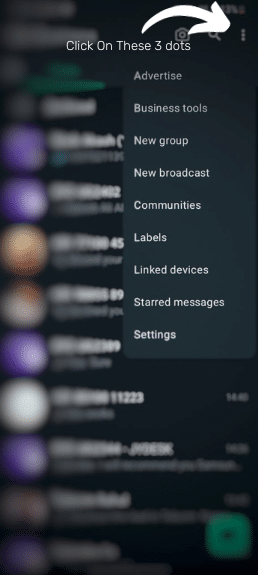
STEP 3: Now tap on ‘Business tools.’ You will see the ‘Messaging’ option where you can set 3 types of automation messages.
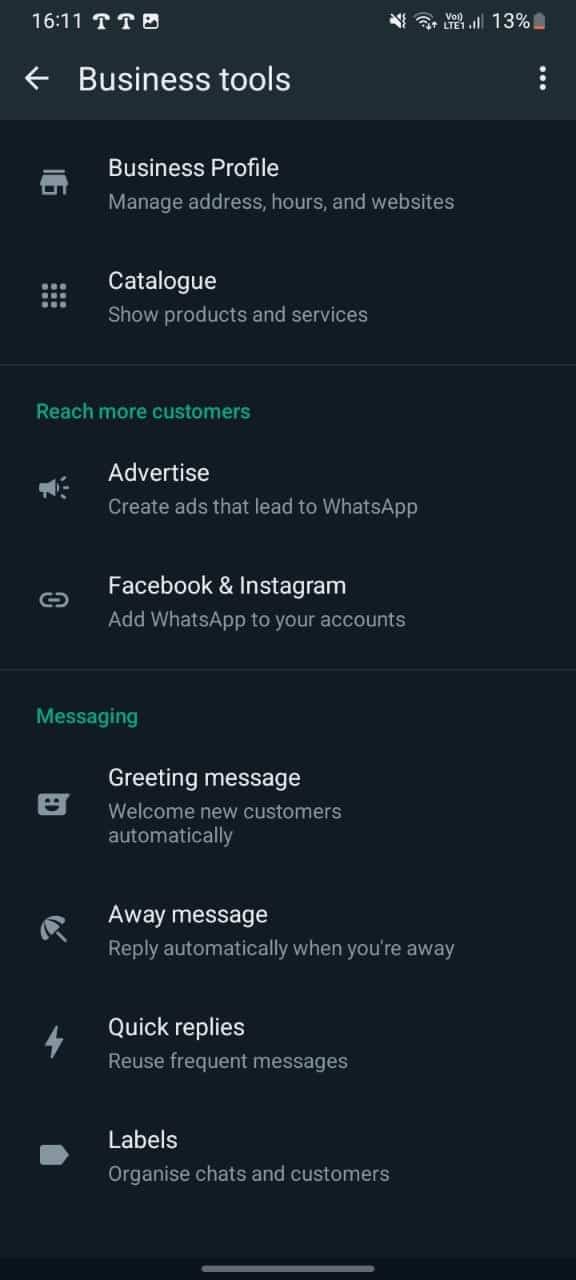
STEP 4: Tap on ‘Greeting message.’
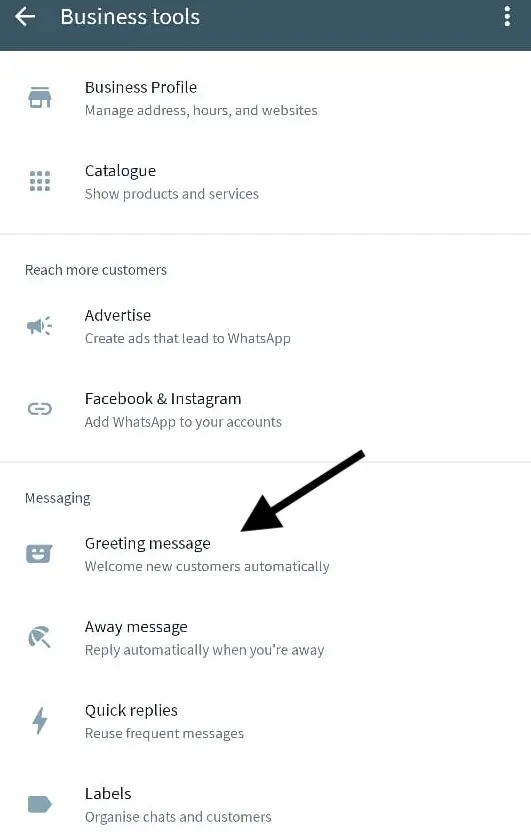
STEP 5: Click on the toggle button and turn the setting to ‘ON.’
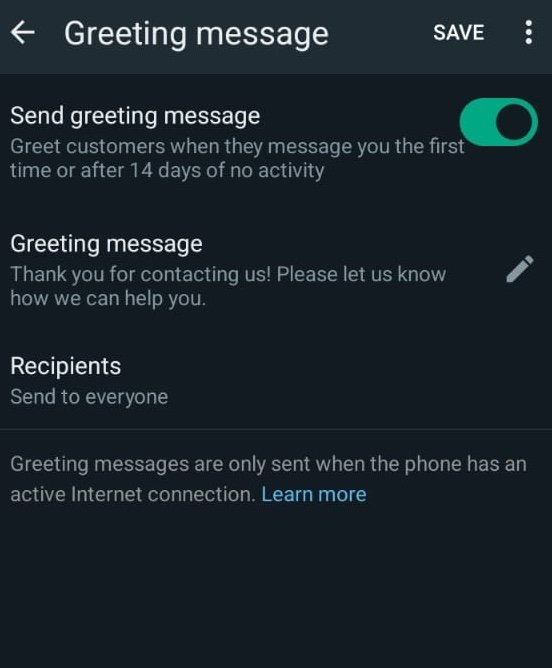
STEP 6: Click on the ‘Edit’ button to customise your greeting message. You can use these copy-paste greeting message templates.
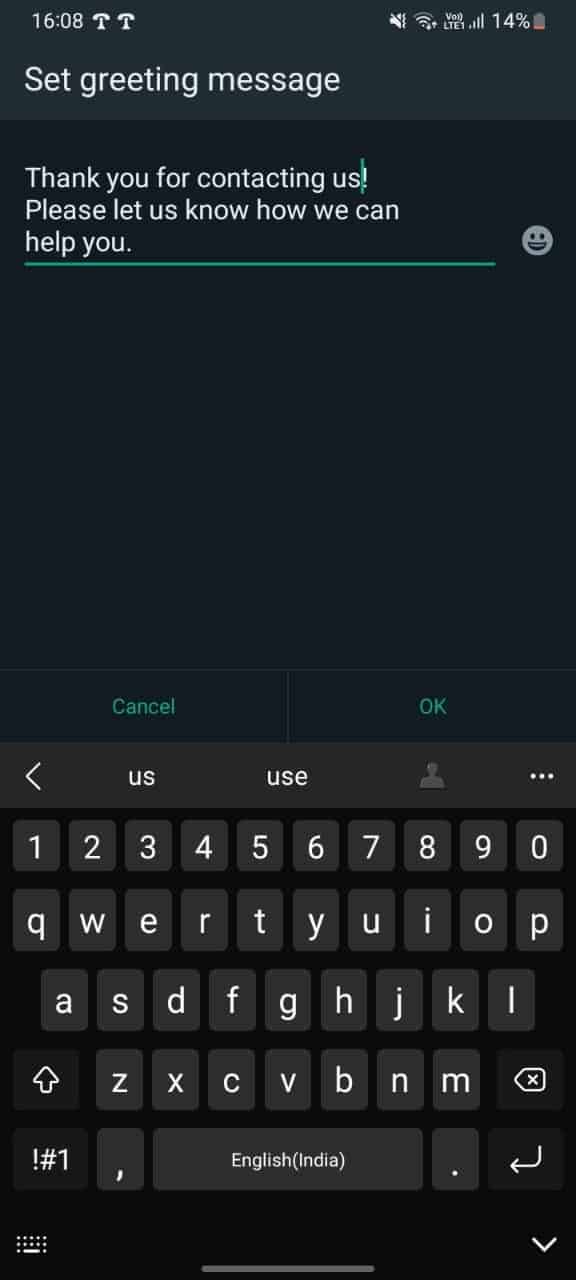
Once you create and save this greeting message, it’ll automatically be sent to your customers as soon as they come to your WhatsApp.
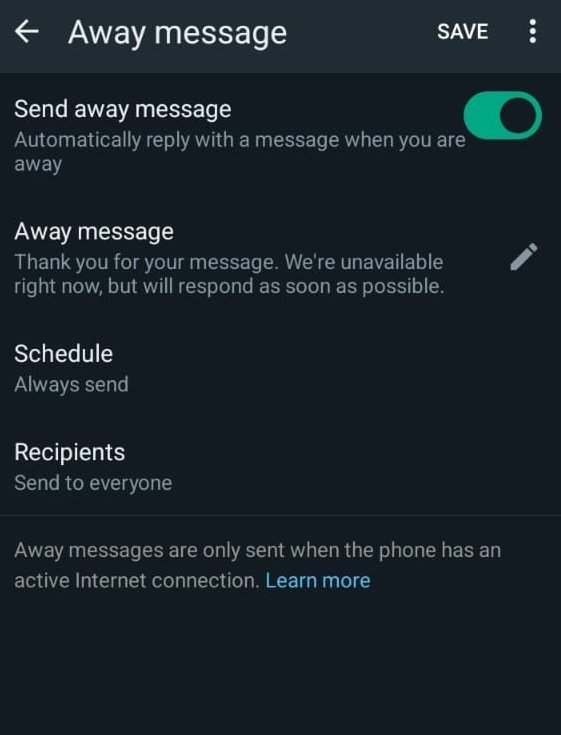
Now customise the edit message according to your requirements
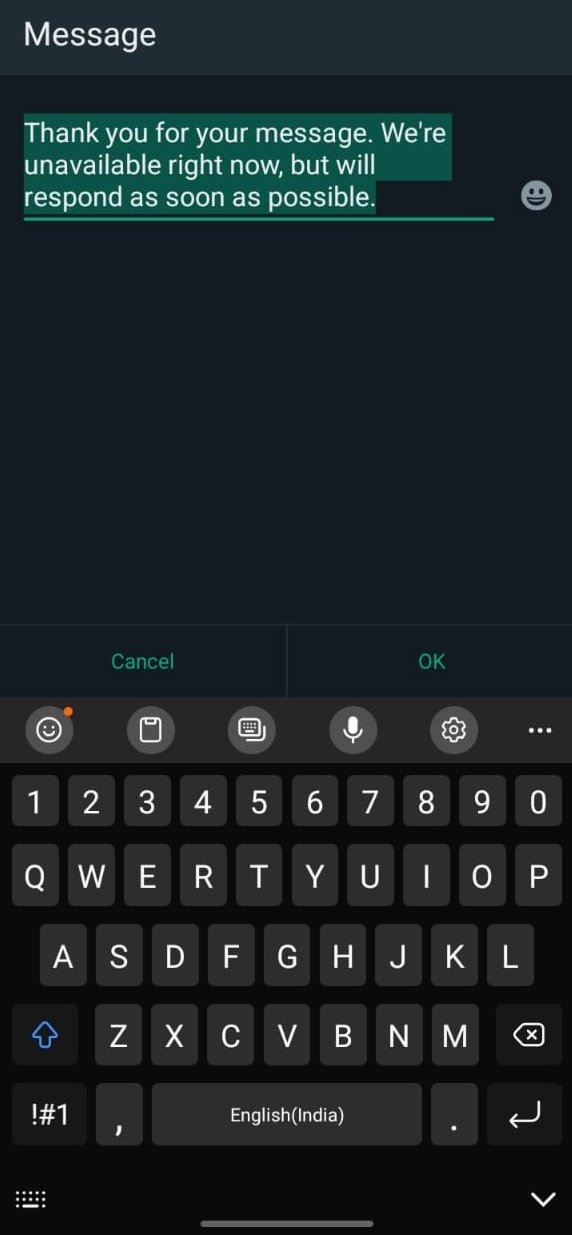
Now your Away messages are set and will be sent on Off days and when you are not available.
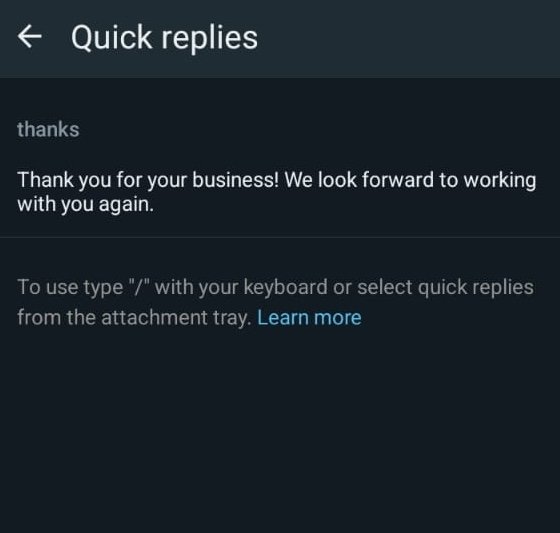
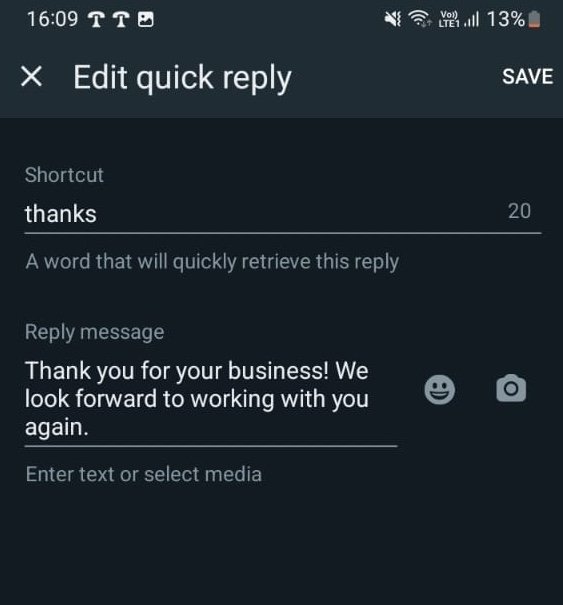
Set a shortcut for your quick message and then set the content for it. As soon as you enter the shortcut in the chat, you select and send a quick reply.
Easy setup and use: The WhatsApp Business app is simple to set up and use, with a user-friendly interface similar to the regular WhatsApp app
Direct customer engagement: As a business owner you can directly engage with your customers through one-on-one conversations, providing personalised service and addressing queries promptly
Branded business profile: You can create a branded profile with information about your company, products and services you are offering
Product catalog showcase: You can showcase your products or services through a catalogue feature, making it easier for customers to browse and make purchase decisions
Automated messaging tools: The app offers automated messages on WhatsApp with basic automated messaging tools, such as automated greeting messages and quick replies, to streamline initial interactions with your customers
Limited scalability: Managing a large volume of customer conversations can become overwhelming, especially as your business grows
Manual response burden: Responding to every customer message manually can be time-consuming and inefficient, especially during peak hours
Lack of advanced automation: The app lacks advanced automation features for complex workflows, such as chatbots and multi-agent support
No integration with CRM: The app doesn’t integrate with customer relationship management (CRM) systems, limiting data analysis and customer insights
Restricted broadcast lists: Broadcast lists are limited to 256 contacts, making it challenging to reach a wider audience with promotional messages
Starting with the WhatsApp Business app is fine, but as your business grows, you’ll need more power, more features and more automation. You need something that can do everything WhatsApp Business can’t – and that something is WhatsApp Cloud API.
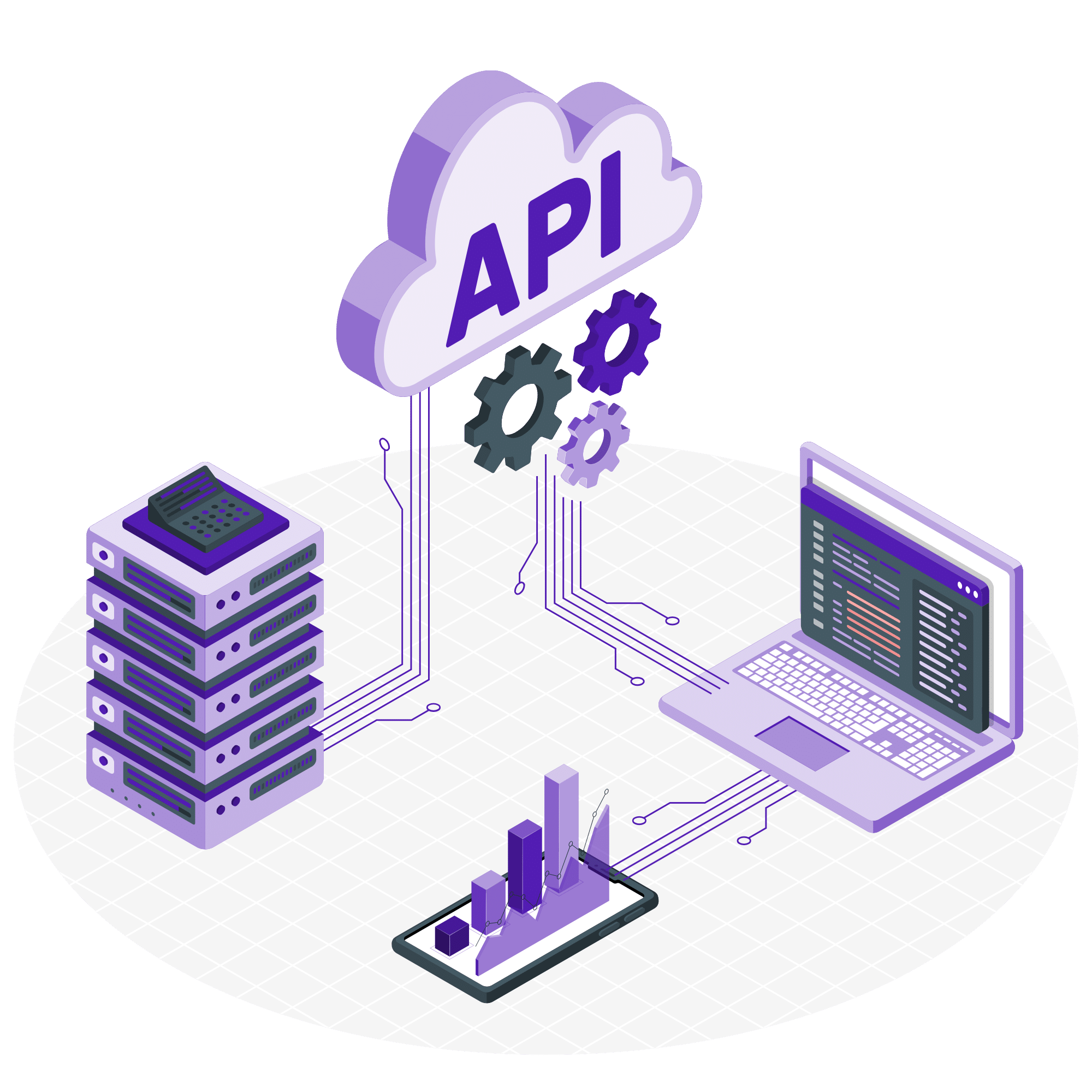
Best for: Growing businesses and teams that want advanced automation, bulk messaging, chatbot flows and CRM integration.
The WhatsApp Business API is officially provided by Meta. But it doesn’t come with a standalone app. It is not something you can download and start using just like a normal WhatsApp or business app. You need an official API provider that offers API integration, and then you can start using the tool.
The WhatsApp API offers features that can be used for a variety of use cases, such as the ability to:
Create and manage WhatsApp chatbots
Send marketing messages in bulk to unlimited prospects at once
Schedule messages based on actions and triggers
Automate specific tasks, such as sending order confirmations or customer support responses, welcome messages, etc.
Track campaign performance: number of leads generated, conversions and a lot more!
Send reminders for Webinars and Demos
Send OTP over WhatsApp for quick verification
And a lot more!
Once your WhatsApp Business API is approved, the next question is: how do you actually use it?
Since the API doesn’t come with a built-in interface, you need a provider, a platform that connects your number to WhatsApp’s backend and gives you tools to send, automate and manage conversations.
But here’s the catch: not all providers are built the same.
Some simply give you access to send messages. Others offer chatbot builders or template management. But if you’re looking to actually turn WhatsApp into a revenue channel, you’ll need more than just messaging.
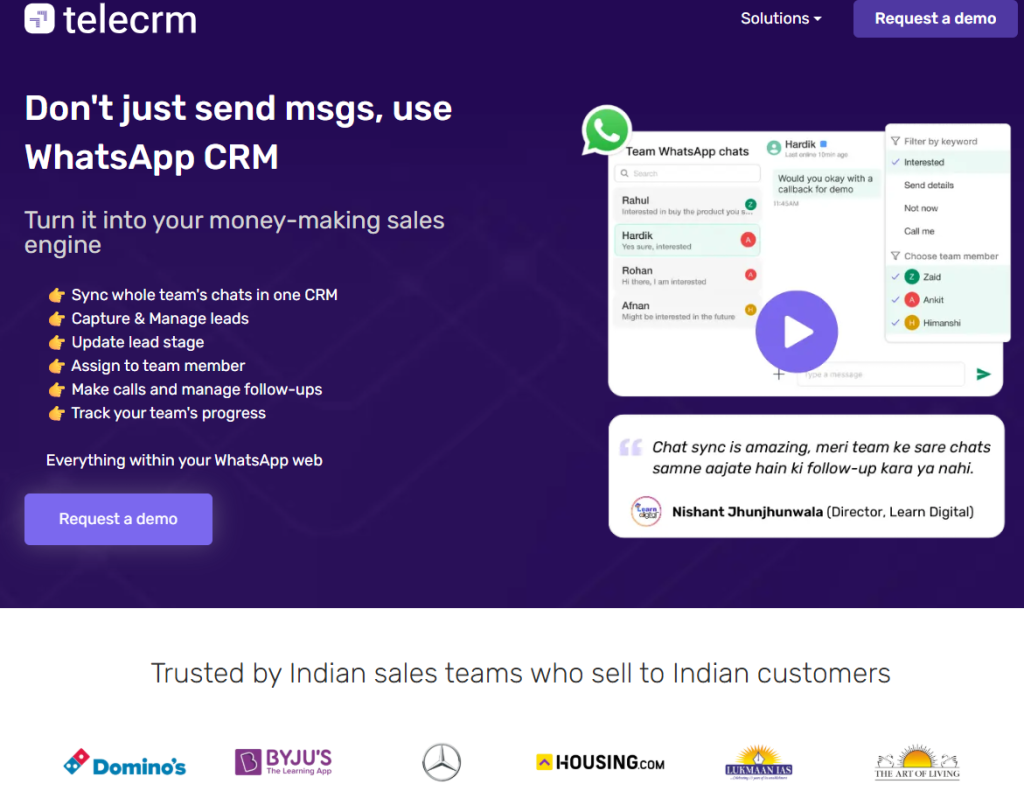
That’s where a solution like Telecrm stands apart.
Telecrm is an API provider plus a full-fledged sales and automation platform where:
So instead of adding another tool to your stack, Telecrm’s WhatsApp CRM helps you unify communication and automation into a single, clean dashboard, built for growing teams who want clarity and scale.
WhatsApp business automation will completely change the way your business communicates by scheduling messages and sending reminders, sending bulk WhatsApp messages, deploying WhatsApp chatbots and automating manual tasks in WhatsApp.
Now that you know the benefits, it’s time for you to take action! You can start doing that by setting WhatsApp Business app, or if you’re interested in WhatsApp API, you don’t have to look any further. We have an amazing solution designed specifically for Indian MSMEs – Telecrm. Book a live demo and transform your sales today!
WhatsApp automation refers to using tools or software to automatically send, schedule or respond to messages on WhatsApp. Instead of manually replying to each customer, you can set up auto-replies, drip campaigns, chatbot flows, reminders or updates based on user actions. It helps businesses save time, respond faster and stay consistent in their communication.
Yes, WhatsApp automation is completely legal. As long as you’re using the official WhatsApp API and following WhatsApp’s messaging policies. That means getting user consent, sending approved message templates and avoiding spammy behaviour. Using third-party tools that aren’t approved by Meta can lead to number bans, so always go with a verified API provider.
To send bulk messages to 1,000 or more people, you’ll need access to the WhatsApp Business API or WhatsApp Cloud API. The regular WhatsApp and WhatsApp Business apps have strict broadcast limits and aren’t built for high-volume messaging. With API access (via a platform like Telecrm), you can send bulk campaigns, schedule messages, personalise content and track delivery — all without getting blocked.



© Copyright 2025 Telecrm.in - All Rights Reserved • Privacy Policy • T&C



© Copyright 2025 Telecrm.in - All Rights Reserved • Privacy Policy • T&C