

Do you remember the last time you opened a business email? No? We didn’t think so either.
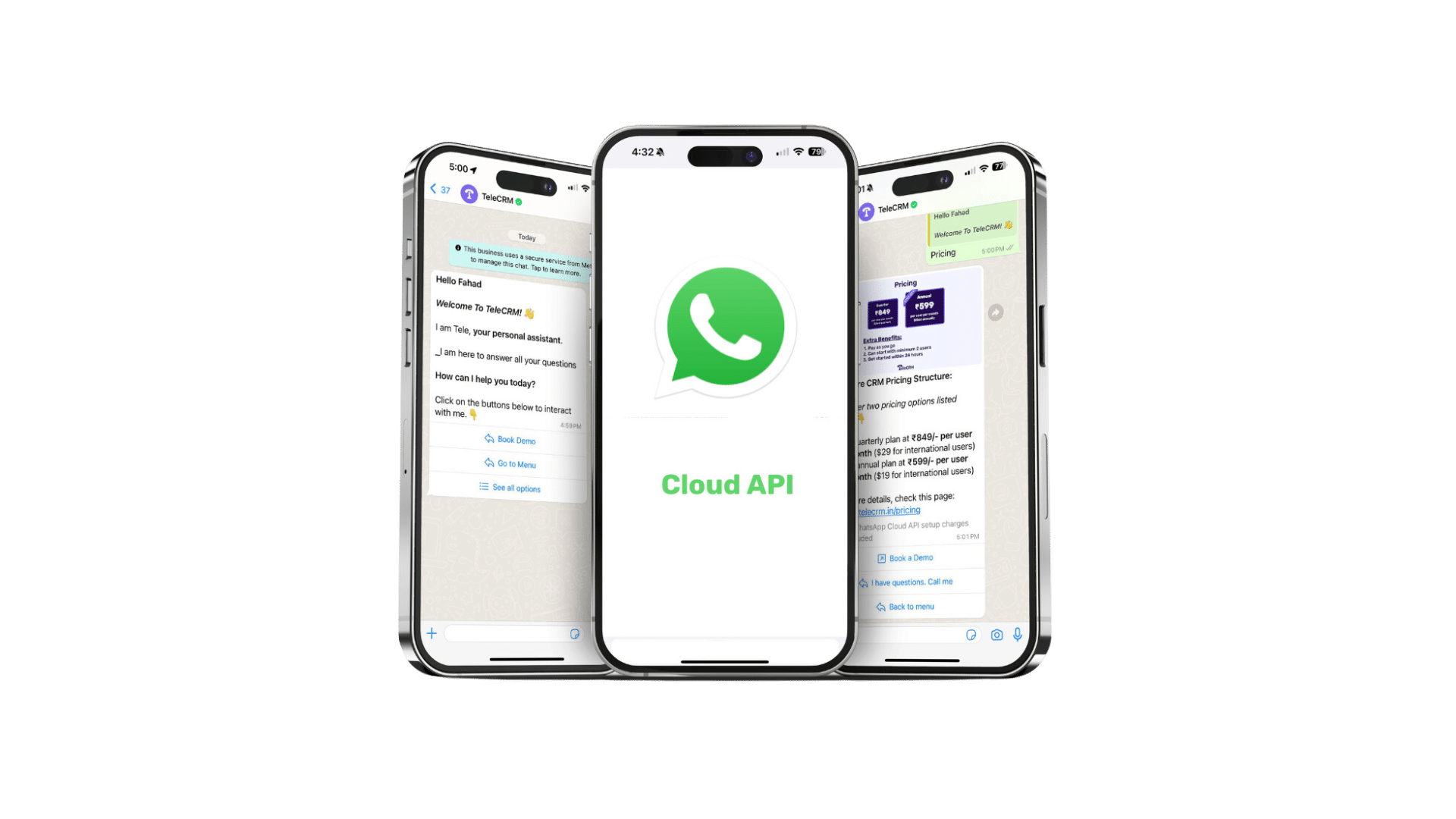
Now, take a moment to reflect on why WhatsApp is so convenient when connecting with friends, family and even office colleagues. What if you could blend WhatsApp’s personal touch with your business’s communication practices? Enter WhatsApp Cloud API.
Meta (formerly known as Facebook) launched WhatsApp Cloud API on May 19, 2022. The idea behind the offering was to give small and medium businesses a chance to utilise WhatsApp not just for sending bulk messages but to set up and implement other automation features as well at a reasonable cost, unlike the On-Premises API.
As WhatsApp Cloud API gains prominence among businesses, we think this guide will help you understand all things WhatsApp Cloud API — how to get started, pricing, features, benefits, setup and best practices.
WhatsApp Cloud API is a feature that allows you to send and receive messages through a cloud-hosted version of the WhatsApp Business Platform. You can schedule and send bulk messages, use a WhatsApp chatbot to interact with leads or customers and completely automate various features of WhatsApp, which isn’t possible on the regular WhatsApp app or its business counterpart.
Meta hosts WhatsApp Cloud API on their servers, so you can use it without having to own or rent a server. It’s both cost-efficient and easy to set up compared to the On-Premises API offered by Meta initially.
WhatsApp Cloud API comes packed with useful features that make it a powerful tool for businesses looking to connect with their customers on a personal level. Here are a few of its unique features:
Automated responses are a lifesaver for keeping your customers engaged around the clock. Setting up greeting messages or auto-replies for common questions related to store hours, service availability or product troubleshooting ensures your customers always receive an immediate response.
Interactive messages take customer engagement to the next level. By incorporating elements like buttons for quick actions or menus for easy navigation, you make it simpler for customers to make decisions, place orders or get the information they need with minimal effort.
Message templates are a game-changer for efficient communication. These pre-approved formats ensure your messages are always in line with WhatsApp’s policies, reducing the risk of them getting flagged as spam.
The end-to-end encryption feature of WhatsApp applies to Cloud API as well. Meaning that only you and your customer can read what’s sent. By today’s standard, having this level of security is paramount since privacy concerns are at an all-time high.
Integrating WhatsApp Cloud API directly with your existing CRM or business tools streamlines your operations like never before. Seamless integration means all customer interactions are automatically logged and accessible within your main system, providing a comprehensive view of customer activities and preferences.
The cloud-based nature of WhatsApp Cloud API offers unparalleled scalability, accommodating your business growth without additional hardware or significant investment. This flexibility allows you to adjust your usage based on business size and needs, whether expanding your customer base, entering new markets or launching new products.
With no upfront investment in servers or infrastructure, as is the case with on-premise API, WhatsApp Cloud API is a cost-effective solution for SME businesses aiming to enhance their communication.
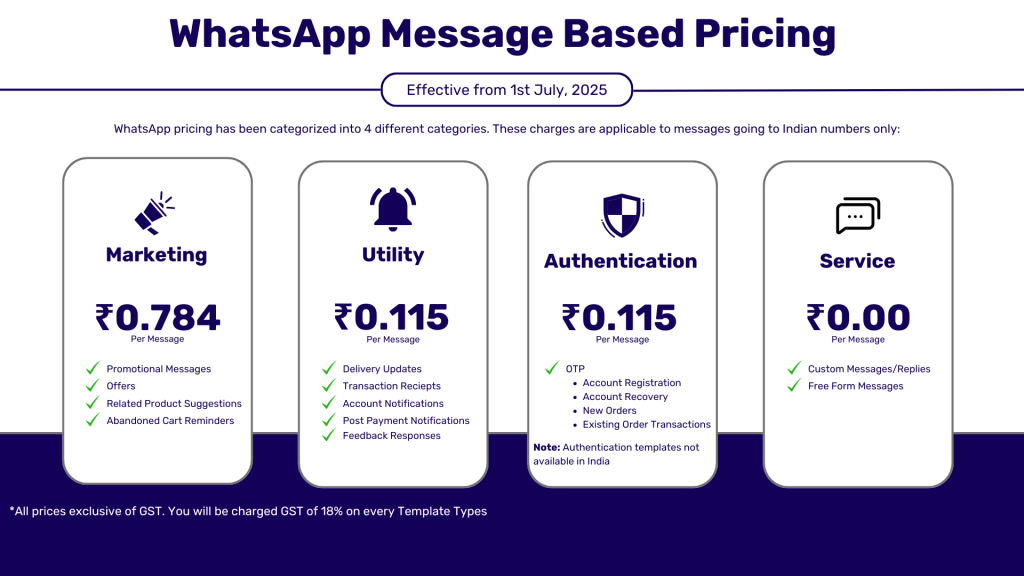
WhatsApp Cloud API charges your business when you talk to customers; it charges you per ‘conversation’. A conversation in this context is defined as the number of messages you send in a 24-hour window.
Marketing: ₹0.78 per message. These are promotional messages where you talk about your products, offers or any new features.
Utility: ₹0.115 per message. These are for transaction-related messages like order confirmations, delivery updates or payment reminders.
Authentication: ₹0.115 per message. For sending one-time passwords (OTPs) to verify the identity of your customers.
Service: ₹0.00 per message. These happen when a customer asks you something and you reply.
The first three types of conversation — Marketing, Utility and Authentication — are the conversations initiated by your business, whereas in Service messages, you will incur no charges when the customer messages you.
Note: These charges are exclusive of taxes. An extra 18% GST is applicable across all four types of conversation for business owners.
If you’re using WhatsApp Cloud API to message your customers, here’s how Meta charges you:
Per-message pricing (not per conversation): You’re charged for every message sent, based on:
For example, if you send one marketing message and one utility message to the same customer, that’s two separate charges.
The good news is that not everything is chargeable! Here’s when you can send messages for free:
This 72-hour window is a huge cost-saver for remarketing and engagement, especially when combined with retargeting ads.
To check exact rates by country or message category, visit Meta’s official WhatsApp Business Platform pricing page
WhatsApp offers different ways for businesses to connect with their customers, each with its own set of features and benefits. Whether you’re a small shop or a big company, understanding the differences between WhatsApp Cloud API, WhatsApp Business API and On-Premises API can help you pick the right tool for your business needs.
Feature | WhatsApp Cloud API | WhatsApp Business API | On-premises API |
Setup Complexity | Easy to set up with minimal technical need. | Need to connect with a BSP (Business Solution Provider) | Complex setup requiring your own servers. |
Cost | Generally lower, pay as you go. | Varies, depends upon the BSP you are getting it from. | Higher due to infrastructure costs. |
Control and Privacy | Managed by WhatsApp, with standard control. | BSP is responsible for the privacy and control of the API | Full control over data and privacy. |
Scalability | Highly scalable with WhatsApp’s cloud. | Depends upon the BSP | Depends on your own infrastructure. |
Integration Ease | Quick and easy with existing tools. | Integration capabilities depends upon the BSP | Highly customisable but complex. |
Maintenance | WhatsApp handles maintenance. | BSP handles all the maintenance for the API | High maintenance with your own team. |
Accessibility | Access from anywhere via internet. | Access from anywhere, needs stable net. | Limited to your network or via VPN. |
Speed and Reliability | Fast and reliable on WhatsApp's servers. | Good, depending on BSP’s infrastructure. | Depends on your own setup. |
Ideal for | Small to medium businesses. | Medium to large businesses. | Large businesses with specific needs. |
Choosing between WhatsApp Cloud API, WhatsApp Business API and On-premises API depends on your business size, technical capabilities and specific needs.
Cloud API is the way to go if your priorities are ease of use and hassle-free setup.
For businesses that need an interface for using the API and would prefer WhatsApp to handle most of the technical heavy lifting, the Business API is a good middle ground.
The On-Premises API offers the most customisation and privacy for large organisations that like to retain full control over their communication infrastructure.
No matter which option you choose, integrating WhatsApp can significantly improve your customer interactions and subsequently your business operations.
There are only two possible sources from which you can get the WhatsApp Cloud API for your business:
Meta
An official tech partner
If you choose Meta, the setup process is quite similar to option two, but there’s one big difference: you need a developer. Why? Meta gives you the tools to send messages, but it doesn’t give you a user interface to manage and use the API feature.
Also, Meta doesn’t have built-in analytics so you won’t know how many of your messages are actually getting delivered, who’s reading them or if your customers or leads can relate to them.
So, the best approach would be to get Cloud API from a tech partner like Telecrm (India’s Best WhatsApp CRM). Here, you will not only get an easy-to-use user interface and built-in analytics but also have dedicated Cloud API setup specialists who will help you get started with WhatsApp Cloud API in no time.
But before you start with the process of getting the WhatsApp Cloud API for your business, there are certain prerequisites you need to have ready.
A phone number with which you can apply for WhatsApp API (You need a number that doesn’t have an active WhatsApp account.)
You need a GSTIN to verify that you are a GST-registered business operating in India
A verified Facebook Business Manager ID. You should set up a Facebook business Page to get this ID
A Visa or Mastercard for payment
Here’s the step-by-step process of signing up for a WhatsApp Cloud API account. If you are strapped for time, watch the setup video below instead.
Here are some of the best practices that will help you use WhatsApp Cloud API to the fullest and, in turn, improve your business communication.
Personalising your communication on WhatsApp isn’t just about using the customer’s name. Dive deep into their purchase history, preferences and previous interactions to tailor your messages.
For instance, if a customer recently bought a laptop from you, follow up with a message suggesting compatible accessories or offering setup assistance. By doing so, you are enhancing the customer experience and opening up opportunities for additional sales in a non-intrusive way.
Quick responses are often the difference between a satisfied customer and a missed opportunity. Set up a WhatsApp chatbot for your Business account to instantly welcome new customers or quickly acknowledge that the customer query has been received and that it is being processed.
Once you have the resources, consider creating a dedicated support team to manage WhatsApp enquiries to ensure someone is always available to respond promptly.
WhatsApp automation should enhance — not replace — personal interaction. Start with automated greeting messages or acknowledgements and use chatbots to filter queries and direct them to the appropriate human agent. Personalise automated messages based on where the customer is in their buyer’s journey or previous interactions.
For example, if someone has just made a purchase, an automated message could provide shipping information or deliver a thank-you note.
The charm of WhatsApp lies in its simplicity. Craft your messages to be clear and direct, avoiding industry jargon or overly lengthy explanations. If a topic requires detailed discussion, guide the customer to a call or email or provide a link to an FAQ page that elaborately covers the subject.
Before sending any message, ensure you have explicit consent from the customer. This can be done by providing an initial opt-in through promotional messages, where the customer agrees to receive communication from you.
Regularly review your contact list and remove those who have opted out or no longer engage with your messages. By doing so, you can prevent your messages from getting marked as spam and it also helps your business stay in compliance with all legal requirements. This also ensures you are maintaining a clean and engaged contact list, improving the effectiveness of your WhatsApp marketing campaigns.
Visuals can be more revealing than text as they add an engaging element to your messages. For example, a short video demonstrating your product’s features can be more compelling than a textual description. Similarly, infographics can be leveraged to summarise key points or benefits that can quickly capture your audience’s attention.
Always ensure that the media you send is optimised for mobile viewing.
Use the analytics provided by WhatsApp Cloud API to monitor message delivery rates and customer responses. Analyse which types of messages yield the highest engagement or conversion rates. This data can inform your content strategy, helping you replicate successful tactics and adjust or abandon those that do not perform well.
Regular analysis helps ensure your messaging remains relevant and is tailored to evolving customer preferences.
Integrating WhatsApp Cloud API into your business communication strategy, along with Telecrm, can revolutionise the way you connect with your customers. The combination of Cloud API and Telecrm not only offers powerful features, ease of use and cost-effectiveness but also helps you manage customer relationships much more efficiently, especially for small and medium-sized establishments. Here are the key takeaways:
Useful features: From automated responses and interactive messages to end-to-end encryption and easy integration with existing tools, WhatsApp Cloud API boasts a range of features to enhance customer engagement.
Pricing model: Businesses are charged based on conversations initiated, with different rates for Marketing, Utility, Authentication and Service conversations. The pay-as-you-go model ensures cost-effectiveness.
Setting up WhatsApp Cloud API Account: Getting started involves creating a Meta developer account, setting up an app, adding WhatsApp to the Meta Business account and integrating with a service provider like Telecrm.
Best practices: Keeping conversations personal, responding quickly, using automation wisely, keeping messages short and simple, respecting privacy, leveraging high-quality media and monitoring interactions are some of the important best practices to follow.
WhatsApp Cloud API vs. other options: Choosing between WhatsApp Cloud API, WhatsApp Business API and On-Premises API depends on the size of your business, technical capabilities and specific needs.
No, WhatsApp Cloud API is not free. It operates on a conversation-based pricing model, charging businesses for every engagement they have with their customers.
You can access WhatsApp Cloud API either through Meta (Facebook) or a tech partner. The process involves creating a Meta developer account, setting up an app and integrating with a tech partner like Telecrm.
Yes, there are two APIs available for WhatsApp, namely, WhatsApp Business API and WhatsApp Cloud API. These APIs enable businesses to integrate WhatsApp into their communication strategies and automate customer interactions.
WhatsApp Business API is offered through BSPs (business solution providers) and has similar features as Cloud API, while WhatsApp Cloud API is cloud-hosted by Meta, offering easier setup and better cost efficiency for businesses.



© Copyright 2025 Telecrm.in - All Rights Reserved • Privacy Policy • T&C



© Copyright 2025 Telecrm.in - All Rights Reserved • Privacy Policy • T&C